Repurposed an old laptop as a home server. Set up Hermes Agent on it — an open-source AI agent that keeps getting better by accumulating persistent memory and reusable skills. It's been running for months.
Hermes overview
Hermes injects three files into the system prompt at session start:
- SOUL.md — identity: personality, tone, style. I write this one.
- USER.md — who I am. The agent maintains it.
- MEMORY.md — what it has learned. Also maintained by the agent.
The agent edits MEMORY.md and USER.md on its own whenever it learns something worth keeping. It also sees a catalog of installed skills with one-line descriptions, and only loads the full content when a task needs it. That saves a lot of context space.
The "self-improving" part isn't just remembering facts. When I hit a non-trivial workflow, Hermes can save it as a skill — a procedure that loads automatically in future sessions when the task matches. Over time it gets better at what I actually do, not at generic chat.
Provider
I use the OpenCode Go subscription — good quality/price, mostly open-weight models. DeepSeek Flash is my daily driver.
The big win: OpenCode gives you an API key for your subscription, and Hermes accepts any OpenAI-compatible key. Bind it and you get datacenter-scale compute (no retention, no training) on a poor old laptop.
Accessing it
It runs on my home server, so you'd assume I need a public IP or a VPN. Nope. Hermes binds to messaging platforms — Telegram, Discord, whatever. I use Telegram, so it's in my pocket.
Additional functionalities
Beyond running commands you can wire in MCPs, APIs, whatever. In my case:
- Google account — via the Google Cloud API I can send a voice message while walking ("Medical appointment tomorrow at 10:00") and it creates the calendar event. Also edits Google Docs.
- Browsing — it drives a real browser. I configured Lightpanda over Chrome: it's built for agents and way less resource-hungry.
The next big problem: with the rise of AI agents, sites are deploying heavy anti-bot/anti-AI measures. It hurts research badly. The workaround is a scraper like Firecrawl, which gets content out of pages behind those protections. Free plan, 1,000 credits/month — genuinely enough for casual research.
Scheduled work: cron jobs
Hermes isn't only reactive. Cron jobs run on a schedule: silent watchdogs poll a condition every few minutes and only message me when something actually happens. Every morning it drops me a news briefing — cybersecurity, AI and tech — in Telegram. Plus keeping my knowledge base in sync: the agent fixes things on its own and pings me when it's done.
Multiple agents
You can run several independent agents as profiles — that's how I have it set up. They share the same skills, but each one has its own memory and permissions. Useful when you want a documentation bot that can work with the same tooling but never touches your main agent's state.
Enhanced memory via OpenViking
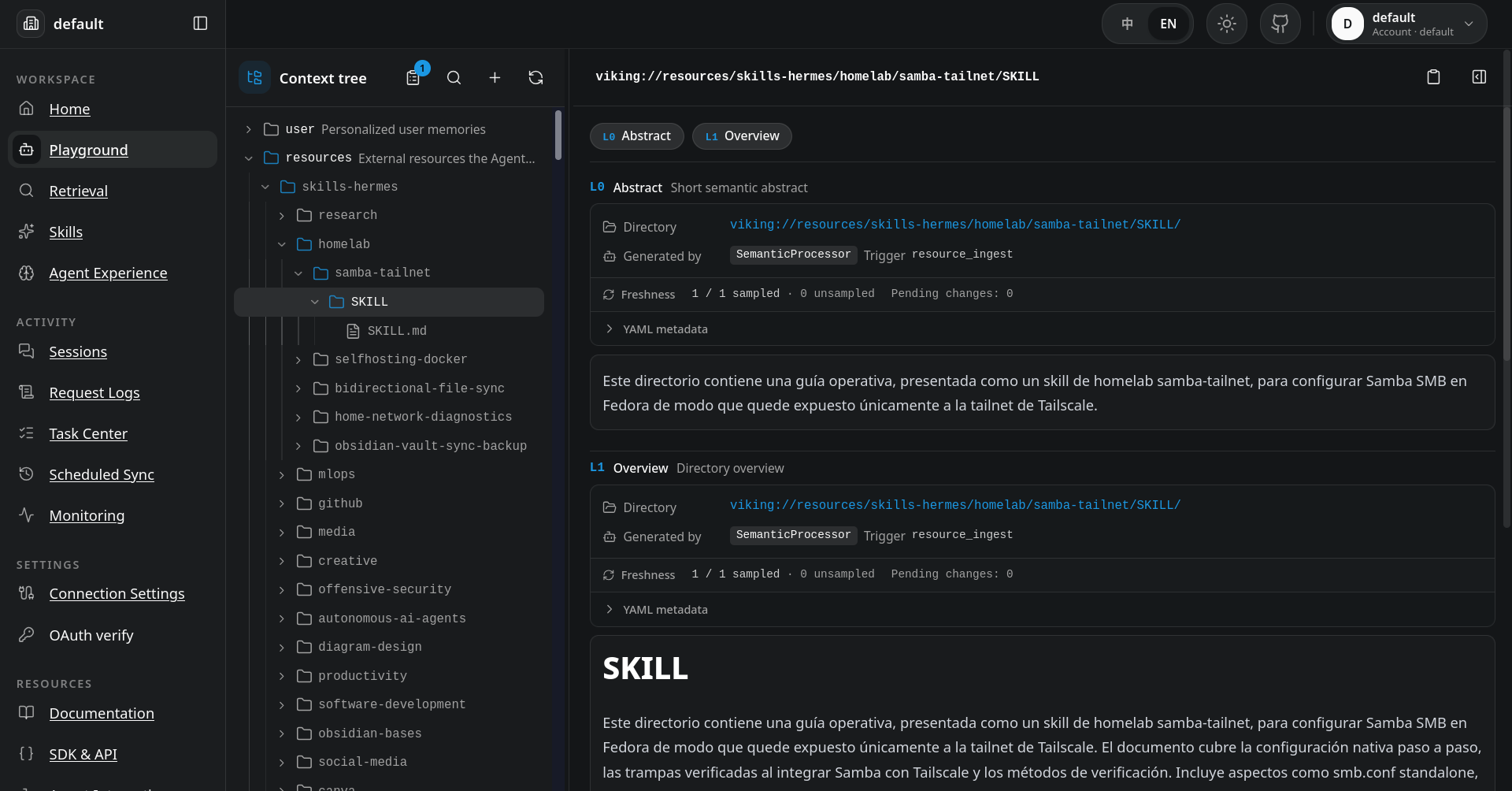
The three files are handy, but they're capped in size to avoid flooding the prompt. That's where OpenViking comes in: a context database that gives the agent effectively unbounded long-term memory — a virtual filesystem (viking://) with layered summaries and vector search.
Embeddings and vectors: the part under the hood
A vector, in this context, is just a list of numbers — 1,024 of them for the bge-m3 model I run locally — produced by an embedding model from a piece of text. The trick is that the model is trained so that texts with similar meaning end up close together in that high-dimensional space. "I prefer dark mode" and "make everything dark" land near each other even though they share almost no words.
The agent never reads those numbers — that's the important part. Everything works through two steps:
- Writing: every chunk of text (memory, resource, session archive) is converted to a vector and stored in a vector index. The raw text stays in the filesystem; the vector is just the pointer.
- Reading: when the agent needs to recall something, the query goes through the same embedding model and becomes a vector. Then it's pure math: find the closest vectors to the query, fetch what they point to, and inject the actual text into the context.
So vectors are the index, not the content. The LLM only ever sees the text that the vector search picked. That's what makes recall semantic instead of keyword-based: it finds related things, not just matching words. On my setup that matters a lot — my notes are full of half-finished commands and shorthand; keyword search would miss half of them.
Embeddings are a statistical approximation, not understanding. They fail at nuance, sarcasm and rare terms, and they only "know" what the embedding model was trained on. That's why the extraction pipeline doesn't trust vectors alone: after the vector pre-filter, an LLM makes the final dedup decision (create, merge, skip). Vectors narrow it down; the LLM decides.
Vision-language models: it can see too
Embeddings only see text. Screenshots, diagrams and photos are invisible to them. That's where the VLM (vision-language model) comes in: when a session contains an image, the extraction step uses the VLM to describe it, and that description gets embedded and stored like any other memory.
The VLM doesn't write the L0/L1 summaries itself. The chain is: VLM turns images into text descriptions → the LLM aggregates all text summaries (from files, images, everything) into the directory's L0/L1 → L2 is the original content, never model-generated. So the VLM is the input stage; the LLM does the summarizing.
This is more useful than it sounds. My notes are full of screenshots of outputs, error dialogs and network maps. With the VLM in the loop, a query like "that enumeration screenshot from the exam" can find the image by what it shows, not by whatever filename I gave it. The agent effectively has eyes on its own history.
VLMs are the slowest and most expensive step in this pipeline, and describe-images-into-text is lossy: the description will always be dumber than the pixels. The token bill is real too. Just migrating the memories I had before moving to OpenViking (roughly two months of usage) burned almost 10 million tokens across the L0/L1 summary generation and the VLM descriptions. I accepted that trade for the ability to search images at all, but I keep it for the screenshots that matter, not for every image that crosses the conversation.

How it grows memory:
- Session commit → automatic extraction (the main one). Commit a session, archive messages, background task generates summaries (L0/L1) and extracts long-term memories. The flow:
Messages → LLM extract → candidates → vector pre-filter → dedup (skip/create/none, merge/delete) → write → vectorize.

- Every commit writes a
memory_diff.jsonfor audit and rollback. Types: profile, preferences, entities, events, identity, soul, cases, trajectories, experiences. - Explicit extraction without a full session commit.
- Direct writes via Hermes (
viking_remember): triggers a session commit + async extraction — that's how my agent's own memories get into the tree. - Agent Evolution pipeline (
experiences): enables cases and trajectories automatically — sessions become reusable execution insights with outcome distributions (success/failure/partial/unknown/unfinished). - Peer memory: memories can live in a stable peer's space if the policy allows.
- Resources:
add_resourceindexes documents with L0/L1/L2 summaries + embeddings — static, user-driven, but it accumulates. - Skills: shared skills under
viking://agent/skills, so every agent on the account can find them.
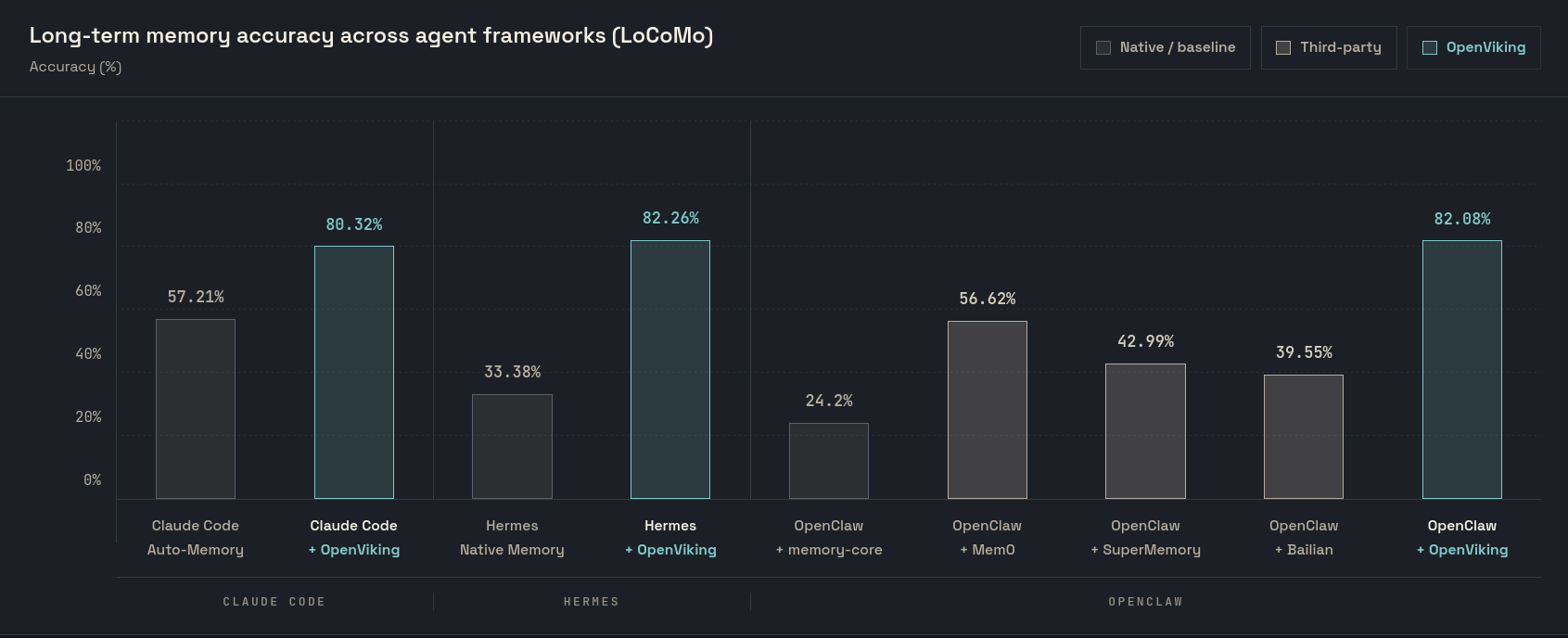
Their published LoCoMo benchmark: ~33% → ~83% accuracy with OpenViking as memory backend, input tokens down 34–91%. Take vendor numbers with a grain of salt. The direction is still clear.
Embeddings are slow — at least on my hardware. I run bge-m3 locally via Ollama on CPU: this is an old laptop with no dedicated GPU. Syncing ~130 skills created a ~4,700-embedding queue that took 2 days. I genuinely underestimated it. Ended up tuning CPU quotas and writing a watchdog. On a machine with a GPU this would clear far faster — the bottleneck is the laptop, not the approach.
Would I recommend it?
Yes, if you already run an agent and hate losing context. It's open source, self-hosted, and it makes the agent stop forgetting — every conversation makes the next one cheaper and smarter. Just have patience with the embedding queue.